Understanding GST Search Results: Business Names, Registration Status and Filing Details
Before you pay a new supplier or accept a large order, it helps to know whether the business is genuinely registered for GST. A few minutes on the government portal can save you from blocked tax credit and payment disputes. The portal shows names, registration status and filing records, but the labels can look confusing at first. Once you know what each field means, reading the results becomes simple. Keep reading to learn what to check and which signs deserve a closer look.
How to run a search online for free
You do not need an account or a login to check a business in India. A free online lookup pulls its details from the official GST database, so the information on screen is current. Using a free GST search tool is the quickest way to confirm a supplier before you record an invoice or release payment.
Follow these steps to run a check:
- Type or paste the 15-character GSTIN into the search box.
- Click the button to generate details.
- Read the results, which appear within a few seconds.
- Match the details with the invoice in front of you.
Reading the business names
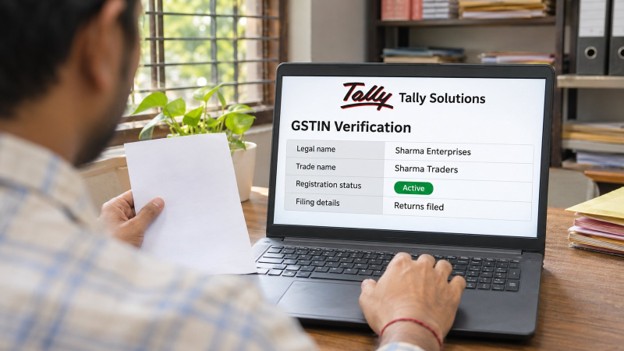
The results page shows two names, and they are often different. Knowing which is which helps you match the record with the invoice in your hand.
- The legal name is the name registered against the PAN. For a sole proprietor, this is usually the owner’s personal name.
- The trade name is the name the business uses in public, such as a shop or brand name.
If the name on your invoice matches neither of these, ask the supplier to explain before you make any payment. The page also shows the constitution of the business, such as proprietorship, partnership or private limited company, which tells you what kind of entity you are dealing with.
Understanding registration status
The status field is the most important detail on the page. It tells you whether the business can legally issue tax invoices at this moment.
- Active means the registration is valid and the business can collect and pass on GST.
- Cancelled means the registration has been closed, either by the taxpayer or by the department.
- Suspended means the registration is on hold, often while a cancellation notice is being reviewed.
Check the taxpayer type as well. A Regular taxpayer charges GST and issues tax invoices. A Composition taxpayer pays tax at a fixed rate and cannot charge GST separately, so you cannot claim input tax credit on purchases from them.
The table below summarises the main fields you will see:
| Field | What it tells you |
| Legal name | Name registered against the PAN |
| Trade name | Name used for everyday business |
| GSTIN status | Active, cancelled or suspended |
| Taxpayer type | Regular or composition |
| Date of registration | When the business joined the GST system |
| Date of cancellation | Shown only if the registration has ended |
| Nature of business | Activities such as retail, wholesale or services |
Checking filing details
A registered business must also file its returns on time. The Track Return Status option, found in the same Search Taxpayer menu, shows which returns a business has filed and when.
Here are the returns you are most likely to see:
| Return | What it covers | How often |
| GSTR-1 | Details of sales made | Monthly or quarterly |
| GSTR-3B | Summary of tax and payment | Monthly or quarterly |
| CMP-08 | Tax payment by composition taxpayers | Quarterly |
| GSTR-9 | Annual return | Yearly |
When you open the filing record, look for these points:
- The status should read Filed for each tax period.
- The date of filing should be close to the due date.
- The pattern should be regular, without long gaps between periods.
A supplier who files late or stops filing can cause trouble for you. Your input tax credit depends on their sales return, so a missed filing on their side can hold up your claim.
Warning signs to watch for
Most records show no problems, but a few patterns deserve a closer look before you continue.
- The GSTIN returns no result or shows an invalid number message.
- The legal and trade names do not match your invoice in any way.
- The status is cancelled or suspended, yet the supplier still charges GST.
- Returns have not been filed for several months.
- The address or business activity does not fit what the supplier actually does.
If you notice any of these, pause the payment and ask for clarification in writing. A genuine business will usually be happy to explain.
Conclusion
Reading a taxpayer’s record is not difficult once you know where to look. Match the legal and trade names with your invoice, confirm that the status is active, and check that returns are filed on time. These three checks protect your input tax credit and help you avoid unreliable suppliers. Make this verification a habit before every new business relationship, and repeat it for existing suppliers every few months, since a registration can change status without much warning.
Reference:
https://cleartax.in/gst-number-search

Pranab Bhandari is an Editor of the Financial Blog “Financebuzz”. Apart from writing informative financial articles for his blog, he is a regular contributor to many national and international publications namely Tweak Your Biz, Growth Rocks ETC.